Lockdown browser & secure exam software for schools: 2026 buyer's guide
By Sidhi Baweja
Sidhi Baweja leads content and marketing at AssessPrep, the AI-powered digital assessment platform for international schools. She writes about exam security, secure on-screen exam delivery, and academic integrity for IB, Cambridge, and Edexcel schools.

TL;DR
A lockdown browser locks down the student device during an on-screen exam. A secure online testing platform does more: it wraps lockdown, randomised question banks, live invigilation, and audit logs into one system, so security is built in rather than bolted on.
Aspect | What it means for your school |
What a lockdown browser does | Restricts the student device during an on-screen exam. Blocks other apps, web browsers, screenshots, copy-paste, printing, and external network requests. |
Lockdown browser vs secure platform | A lockdown browser is one feature. A secure online exam software platform combines lockdown, randomised banks, live monitoring, and forensic logs in one place. |
What to look for when buying | Use the 8-point checklist below: lockdown, randomised banks, live invigilation dashboard, audit logs, identity controls, offline resilience, SIS/gradebook integration, and built-in vs bolt-on. |
What lockdown cannot catch | Off-device cheating: a second phone under the desk, a peer in the room. Lockdown handles the ~90% of cheating that happens on the exam device, not everything. |
Built-in beats bolt-on | Security stitched together from separate tools leaves seams. An integrated secure assessment platform closes them. |
What a lockdown browser actually does
A lockdown browser is software installed on a student's device that restricts activity during an on-screen exam. It blocks other applications, web browsers, copy-paste, screenshots, printing, and external network requests, so the student can only access the exam itself.
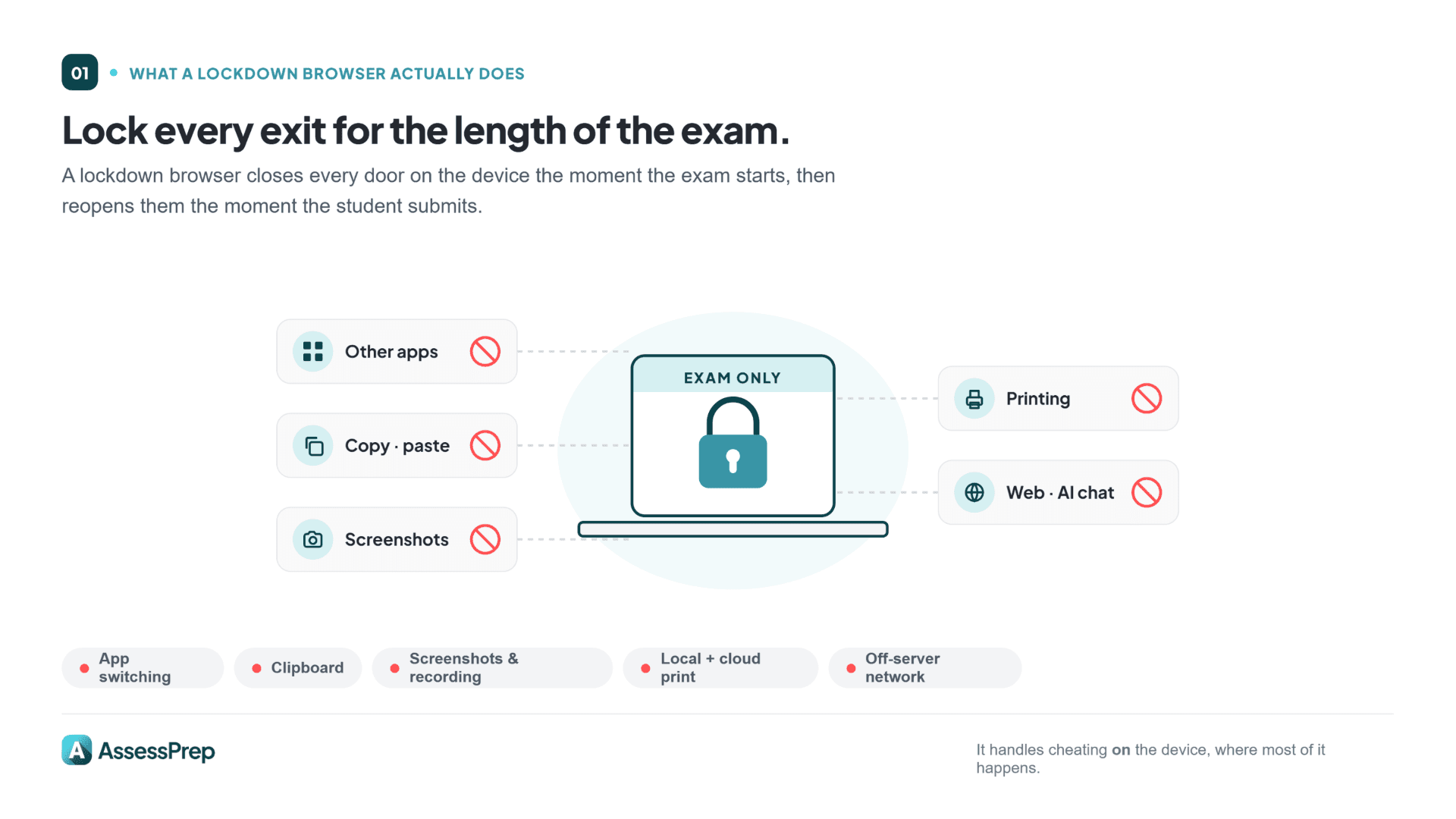
That is it in one sentence. The rest is detail.
Schools use lockdown browsers because a typical laptop or tablet is a poor environment for an exam by default. Browser tabs, chat apps, AI chatbots, search engines, shared documents, screenshot tools: all of them are one tap away. A lockdown browser closes those doors for the duration of the assessment and reopens them when the student submits.
Why schools use lockdown browsers
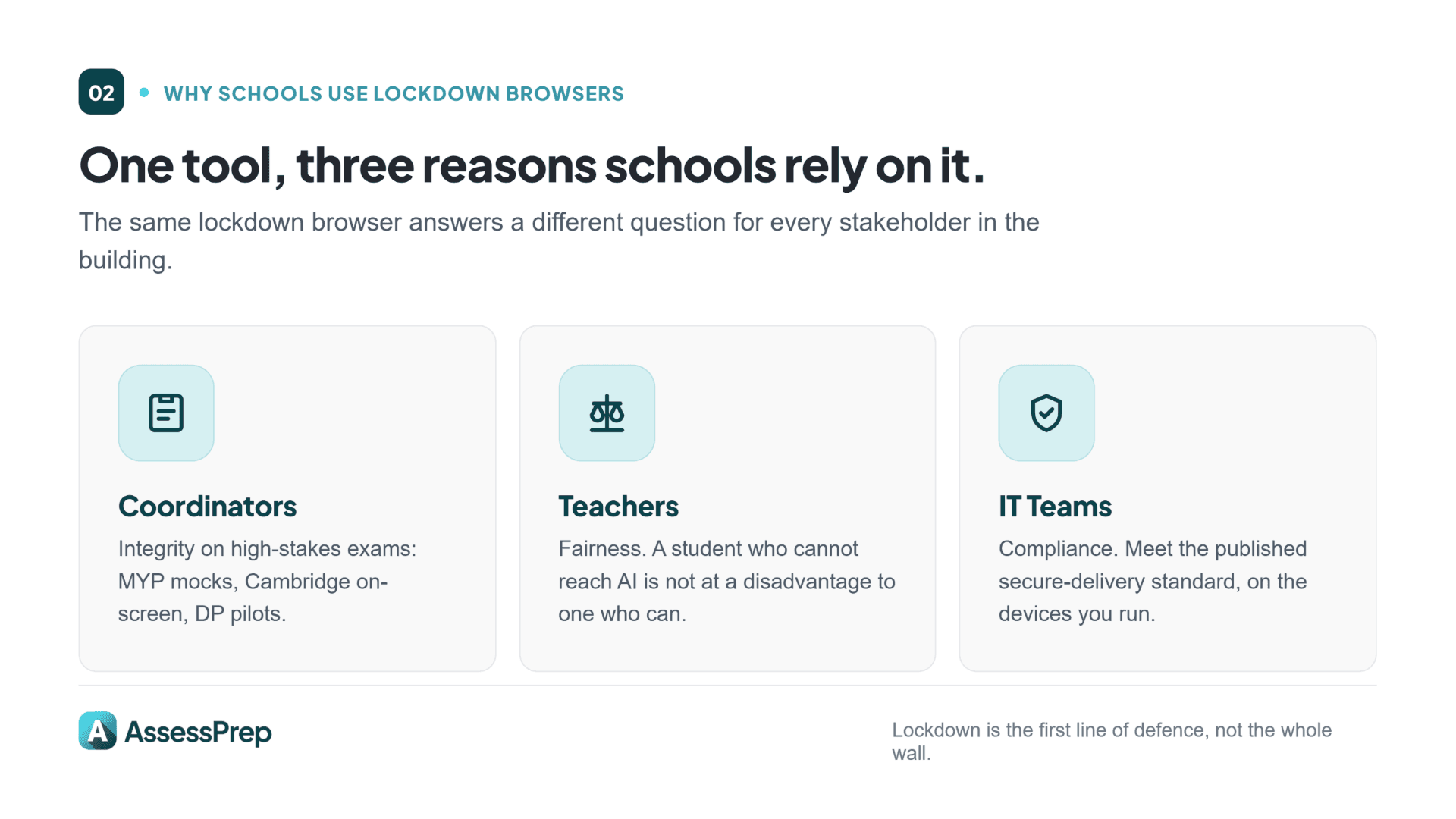
Three reasons matter to international schools, and they look different for different stakeholders.
For coordinators, it is about exam integrity on high-stakes assessments: MYP eAssessment mocks, Cambridge on-screen components, DP pilot exams, and internal final exams. Lockdown is the first line of defence.
For teachers, it is about fairness. A student who cannot use AI chatbots is at a disadvantage against one who can. Lockdown evens that out. The assessment becomes about what the student knows, not about what their device allows. If you are still setting classroom-level rules, our guide on how to prevent cheating in online exams covers the practical side.
For IT teams, it is about compliance. Some curriculum bodies specify secure delivery requirements for on-screen assessment. Schools running those assessments need a lockdown solution that meets the published standard.
Lockdown does not catch everything. A student with a second phone under the desk is not defeated by browser-level lockdown. But it handles possible cheating that can happen on the exam device, which is where most cheating actually happens.
What a good lockdown browser should block
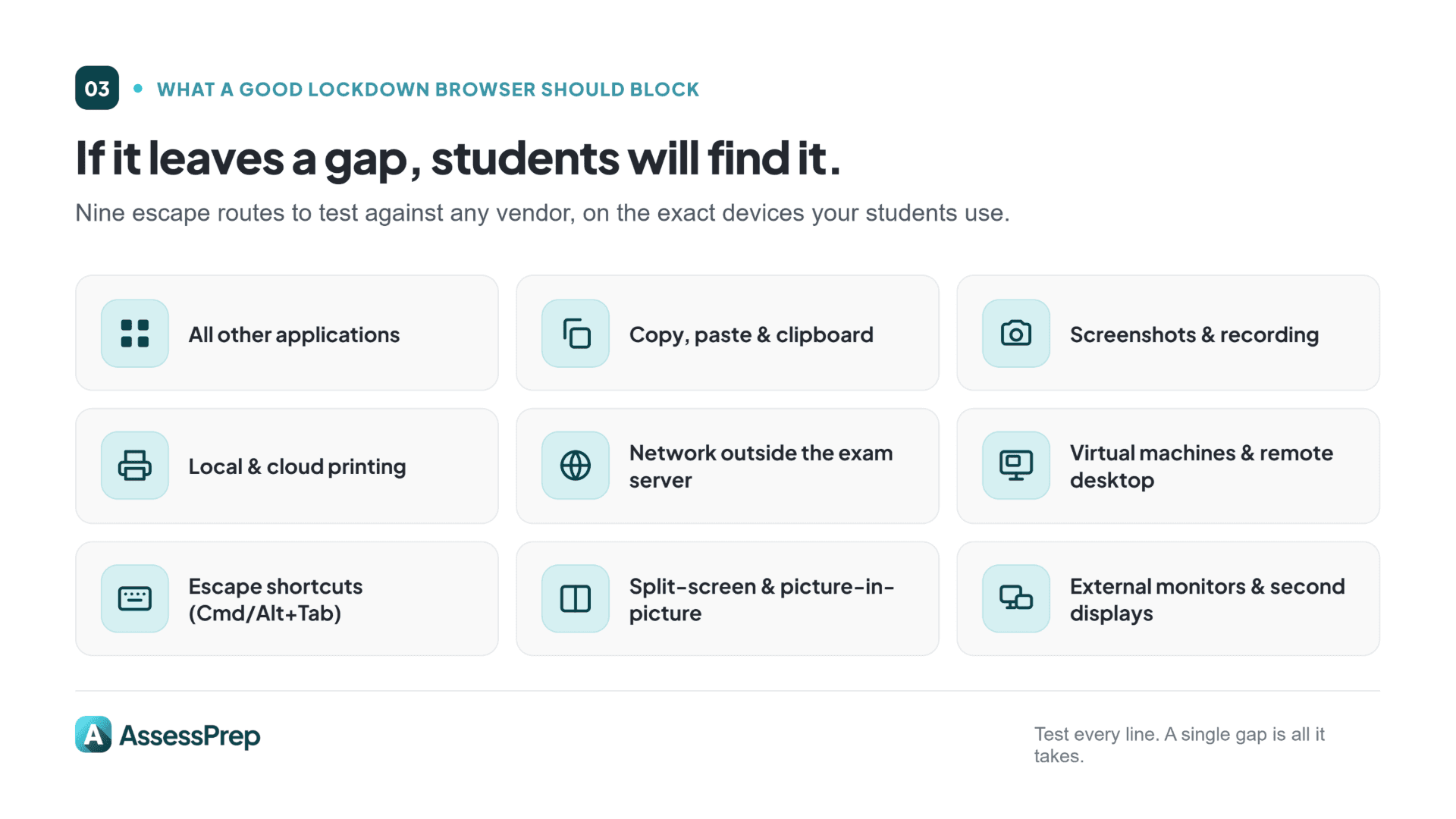
When you evaluate any lockdown browser, confirm it blocks every item on this list:
All other applications: No switching to Word, Safari, Chrome, Discord, WhatsApp, Slack, or anything else
Copy, paste, cut, and clipboard access
Screenshots and screen recording (macOS and Windows)
Printing: local and cloud
Network access outside the exam server, so no Googling, no ChatGPT, no shared Google Docs
Virtual machines and remote-desktop sessions
Keyboard shortcuts that escape the browser (Cmd+Tab, Alt+Tab, Cmd+Q, Alt+F4)
Split-screen, picture-in-picture, and multi-window modes
External monitors and second displays
If a lockdown browser leaves any of these gaps, students will find them. Test every item on this list against any vendor you are considering, on the devices your students actually use.
A secure browser is one piece of the puzzle. The harder question is what the whole platform around it should do. That is where the buyer's checklist comes in.
What to look for in a secure exam platform: An 8-point checklist
A lockdown browser secures one device. A secure online testing platform secures the whole exam: the questions, the room, the identity of the student, the network, and the grade that comes out the other end. When you are comparing secure online exam software, work through these eight points and ask how each one is delivered: built into the platform, or bolted on from a separate tool.
1. Lockdown / secure browser. Closes the device-level cheating: app switching, clipboard, screenshots, off-server network. This is the floor, not the ceiling. Every serious platform has it; the difference is whether it is native or a third-party add-on you license and configure separately.
2. Randomised question banks. Randomising question order and pulling from a larger bank means no two students see the same paper in the same sequence, which kills peer copying and question leakage between sessions. A platform should have this ability built-in.
3. Real-time invigilation dashboard. Live monitoring lets an invigilator see who is in the exam, and who has dropped out as it happens. Exam invigilation software that only reports after the fact leaves you blind during the exam itself.
4. Audit logs and post-exam forensics. Timestamps, device metadata, and lockdown-exit attempts, all recorded and searchable after the exam. This is how you answer the awkward questions later: Why did one student finish in 18 minutes? Why did five submit at the same second?
5. Identity and impersonation controls. Confirm the student sitting the exam is the student enrolled. At minimum this means authenticated sign-in tied to your school roster, so a student cannot sit an exam on a peer's behalf.
6. Offline resilience. Networks drop. A secure platform caches responses locally and re-syncs when the connection returns, so a Wi-Fi blip does not cost a student their answers or hand them an excuse to restart. Ask any vendor exactly what happens on network loss. School IT teams can also use infrastructure monitoring tools to detect network or server issues during live exams.
7. Integration with your SIS and gradebook. Secure delivery is wasted if grades are then exported to a spreadsheet and re-keyed by hand. Look for a platform that pushes results straight into your gradebook and analytics, so the secure chain runs from question to grade without a manual gap.
8. Built-in vs bolt-on. This is the one that ties the other seven together. A stack stitched from a separate lockdown browser, a separate proctoring tool, and a separate exam engine has seams, and seams are where integrity and IT support both break down. An integrated secure assessment platform for schools closes those seams because security is a property of the whole system, not an accessory. With AssessPrep, secure exams are built in, so there is no separate lockdown browser to bolt on.
If you are comparing named products rather than features, our roundup of the top digital assessment platforms for schools and the head-to-head AssessPrep vs Exam.net comparison go deeper on specific tools.
Lockdown browser vs secure assessment platform
Short version: a lockdown browser is a feature; a secure assessment platform is the system that feature lives in.
A lockdown browser locks the device. A secure online testing platform locks the device and randomises the paper, and monitors the room live, and keeps the forensic log, and delivers the grade securely. If your school only needs to lock a handful of devices for one occasional test, a standalone browser can do the job. If you run high-stakes on-screen exams across year groups and curricula, the platform approach removes the integration work, the licensing sprawl, and the gaps between tools. For the proctoring-specific version of this question, see proctored exams vs lockdown browser.
Beyond lockdown: What audit logs tell you
Lockdown browsers are the first line of defence. Audit logs are the second, and they cover what lockdown cannot.
Even with a perfect lockdown, questions come up after an exam:
Why did one student finish a 90-minute exam in 18 minutes?
Why did five students submit at the exact same second?
Did an answer get pasted in from somewhere else?
Did a student attempt to exit lockdown mode mid-exam?
A good assessment platform records every student action, with timestamps, device metadata, and input patterns. The log is where you find the answer.
What to look for:
Unrealistic finish times. If a student completes a complex paper in a fraction of the expected time, it is worth a look. Sometimes the explanation is genuine. Sometimes it is not.
Synchronised submissions. Five students submitting within the same 10-second window on a difficult paper suggests coordination worth investigating.
Paste-pattern anomalies. A single paste event producing a 400-word answer is structurally different from typing. Good platforms flag this.
Lockdown-exit attempts. Any attempt to exit lockdown or switch applications should be logged and visible to the invigilator in real time.
Burst detection: When a student is idle for over 30 seconds and then suddenly adds a massive burst of text (greater than 80 characters).
None of these are smoking guns on their own. They are signals. The point is not to "catch" students. It is to give teachers and coordinators the information they need to have an honest conversation when something looks off.
How AssessPrep supports lockdown and audit logs
We have built tools that work during the exam and after it is done.
Here is what you will find inside:
Real-time monitoring: Keep an eye on who is in the exam, track participation, and spot absentees, all in one place.
Detailed activity logs: See every student's exam journey. You get timestamps, device details, and every key action they took.
Post-exam forensics: use the logs to track patterns and behaviours that do not quite add up. These tools do not just flag problems, they help spark better conversations.
Read how AssessPrep helps you monitor your assessments with confidence.
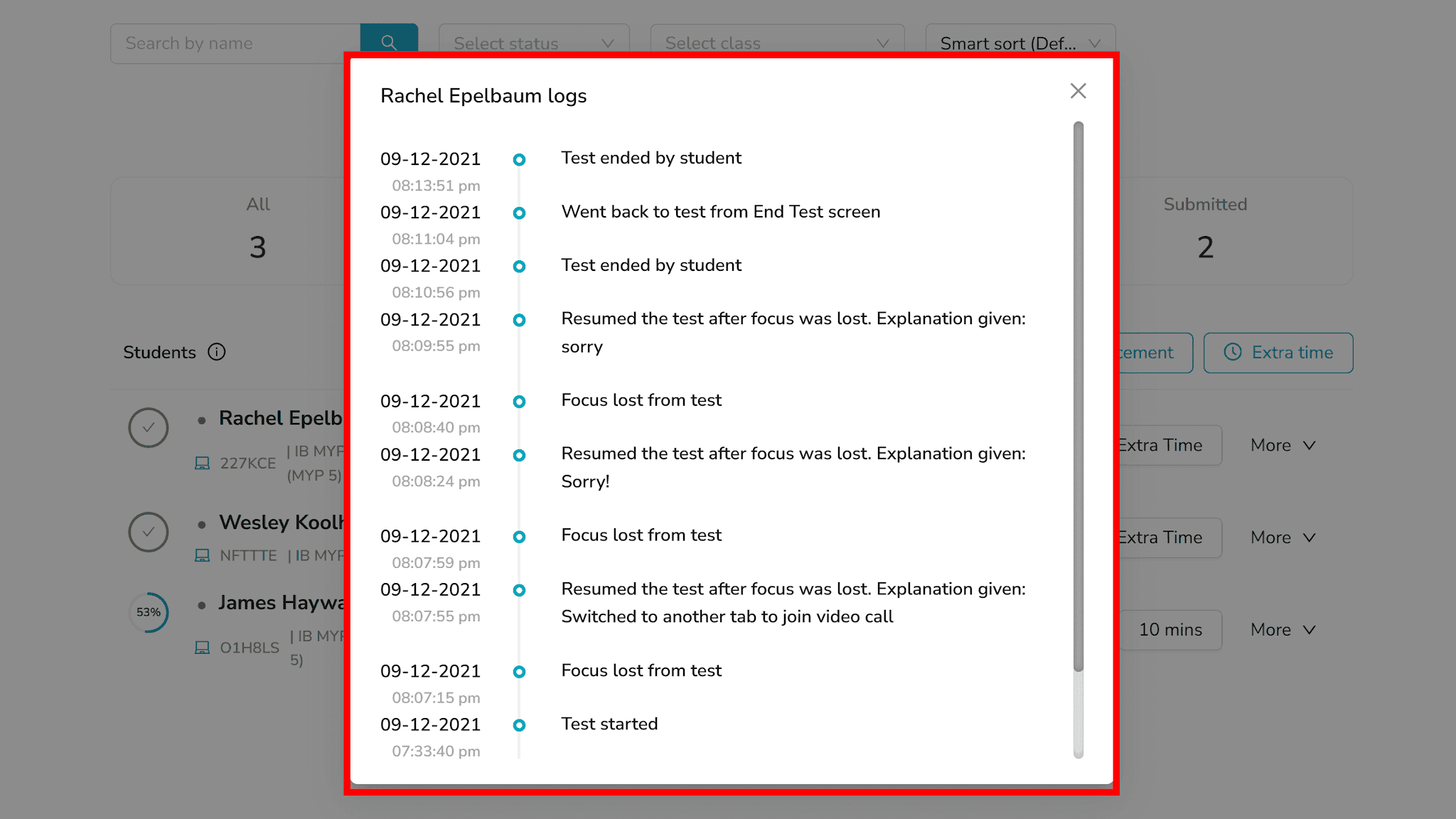
International schools running this at scale see the difference. Dubai National School moved its high-stakes exams onto AssessPrep and runs secure delivery, live monitoring, and forensic logs from one platform rather than three.
How teachers and lockdown software work together
Good tech sets the guardrails. Teachers bring the judgement, the fairness, and the follow-through.
With AssessPrep, you get both:
A strong lockdown browser to stop cheating at the source
A clear audit trail to guide follow-ups
Smart analytics to support your decisions
Over 800 schools use AssessPrep to make sure every assessment is fair, honest, and trusted by everyone involved. For the bigger picture on protecting exams in the digital-exam era, see our pillar guide on academic integrity in international schools.
Run secure on-screen exams on AssessPrep
AssessPrep is a secure online testing platform with lockdown built in. A real-time invigilator dashboard during the exam, full activity logs after, and secure delivery from question to grade. Used by 800+ IB, Cambridge, and Edexcel schools across 85+ countries. See plans and pricing or start a 30-day free trial.
Key takeaways
A lockdown browser restricts the student device during an on-screen exam: it blocks other applications, browsers, copy-paste, screenshots, printing, and external network access.
A lockdown browser is one feature; a secure online testing platform combines lockdown, randomised question banks, live invigilation, and forensic audit logs in one system.
When buying secure online exam software, work through the 8-point checklist: lockdown, randomised banks, live invigilation dashboard, audit logs, identity controls, offline resilience, SIS/gradebook integration, and built-in vs bolt-on.
Built-in beats bolt-on. Security stitched from separate tools leaves seams; an integrated secure assessment platform closes them. Tools like Respondus, Honorlock, and ProctorU add a layer on top of exams built elsewhere.
AssessPrep combines lockdown with a real-time invigilator dashboard and detailed activity logs, used by 800+ IB, Cambridge, and Edexcel schools across 85+ countries.
Frequently asked questions
What should schools look for in a secure online exam platform?
Look for eight things: a lockdown/secure browser, randomised question banks, a real-time invigilation dashboard, audit logs and post-exam forensics, identity and impersonation controls, offline resilience, integration with your SIS and gradebook, and security that is built in rather than bolted on. A platform that delivers all eight secures the whole exam chain, from question to final grade, not just the student's device. AssessPrep is used by 800+ schools across 85+ countries for exactly this.
What is the difference between a lockdown browser and a secure assessment platform?
A lockdown browser is a single feature that restricts the student's device during an exam. A secure assessment platform is the wider system it lives in: it adds randomised question banks, live invigilation, forensic audit logs, identity checks, and secure grade delivery. The browser locks one device; the platform secures the whole exam. For high-stakes on-screen exams across year groups, the platform approach removes the gaps between separate tools.
Do you need separate lockdown software if your assessment platform already has it built in?
No. If your assessment platform includes lockdown natively, a separate lockdown browser adds licensing cost, configuration work, and integration seams without adding security. Bolt-on tools such as Respondus, Honorlock, or ProctorU exist to add a lockdown or proctoring layer to exams built somewhere else. With a platform like AssessPrep, secure exams are built in, so there is nothing separate to install, license, or stitch together.
What is a lockdown browser for schools?
A lockdown browser is software installed on a student's device that restricts activity during an on-screen exam to ensure a secure testing environment. It blocks other applications, web browsers, copy-paste, screenshots, printing, and external network requests, ensuring the student can only access the exam.
Do MYP and DP on-screen exams require a lockdown browser?
For MYP eAssessment, the IBO requires schools to use an approved on-screen assessment platform that delivers exams in a controlled environment. For internal mocks and school-level high-stakes exams, using a lockdown browser is highly recommended to maintain academic integrity, though it is not strictly mandated by the IBO.
What is the difference between Respondus and Safe Exam Browser?
Respondus LockDown Browser is a commercial product requiring institutional licensing, whereas Safe Exam Browser (SEB) is a free, open-source tool used globally. Respondus is often easier to deploy for schools, while SEB offers extensive customisation but requires more significant IT configuration to manage effectively. Both are bolt-on browsers layered onto exams built elsewhere, rather than integrated platforms.
Which assessment platform has a lockdown mode?
AssessPrep is an end-to-end secure online testing platform that includes a robust lockdown mode to safeguard academic integrity and prevent cheating during exams. It provides a specialised environment that mirrors high-stakes testing conditions while offering built-in monitoring tools for teachers.
Articles
Read more from our blog

6 digital assessment tools international schools actually use in 2026
Six digital assessment tools for IB, Cambridge and Edexcel teachers, sorted by create, deliver or mark, with what each one cannot do.

10 academic integrity examples for international schools
10 real academic integrity examples for IB, Cambridge & Edexcel schools: what honest work looks like in practice, plus the classroom strategy behind each one.
3 mind read